WorkRoute
Streamlining work requests through smart task assignment and centralized project management

INTRODUCTION
WorkRoute is a project management platform designed to streamline the process of receiving, organizing, and assigning work requests within an organization.
The platform addresses the challenge of managing multiple incoming requests from project managers and ensures that each task is routed to the right team member based on availability, expertise, and workload.
The goal was to create a clear and efficient workflow that improves collaboration, reduces manual coordination, and provides managers with better visibility and control over ongoing tasks
THE PROBLEM - CHAOS OF UNTRACKED WORK REQUESTS
Organizations receive numerous work requests from different project managers every day, making task management complex and time-consuming.
Without a centralized system, requests are difficult to track, prioritize, and assign efficiently. This often leads to delays, unclear ownership, and reduced team productivity.
THE GOAL
Design a centralized platform that simplifies work request management by enabling efficient task assignment, clear workflow visibility, and seamless collaboration between project managers and team members.
THE VALUE

Centralized management of all work requests

Faster and smarter task assignment

Improved visibility into workload and progress

Better collaboration between teams
RESEARCH
01
Lack of a centralized workflow
Project managers struggle to track requests that are distributed across emails, messages, and different tools.
02
Difficulty prioritizing tasks
Managers need better visibility into workload and deadlines to assign tasks effectively.
03
Unclear task ownership
Users often lack clarity about who is responsible for each request and its current status
04
Time-consuming coordination
Manual communication and follow-ups consume valuable time and slow down project progress.
Eilat, 45
Quality Manager | Ameral | 12 years of experience
Divorced, mother of two
Background
Eilat is responsible for managing quality processes and coordinating work requests within the organization. Over the years, she has been using an internal form created by a former employee, which no longer fully meets her needs.
"I need an application that works the way I need it to. I want to control incoming requests, decide who handles each task, and most importantly — reduce unnecessary conversations. I want a 'set it and forget it' solution."

PERSONA
THE SOLUTION
WorkRoute provides a centralized platform that allows managers to receive, organize, and assign work requests efficiently. The solution reduces manual coordination, improves workflow visibility, and enables teams to collaborate more effectively.
Before

After
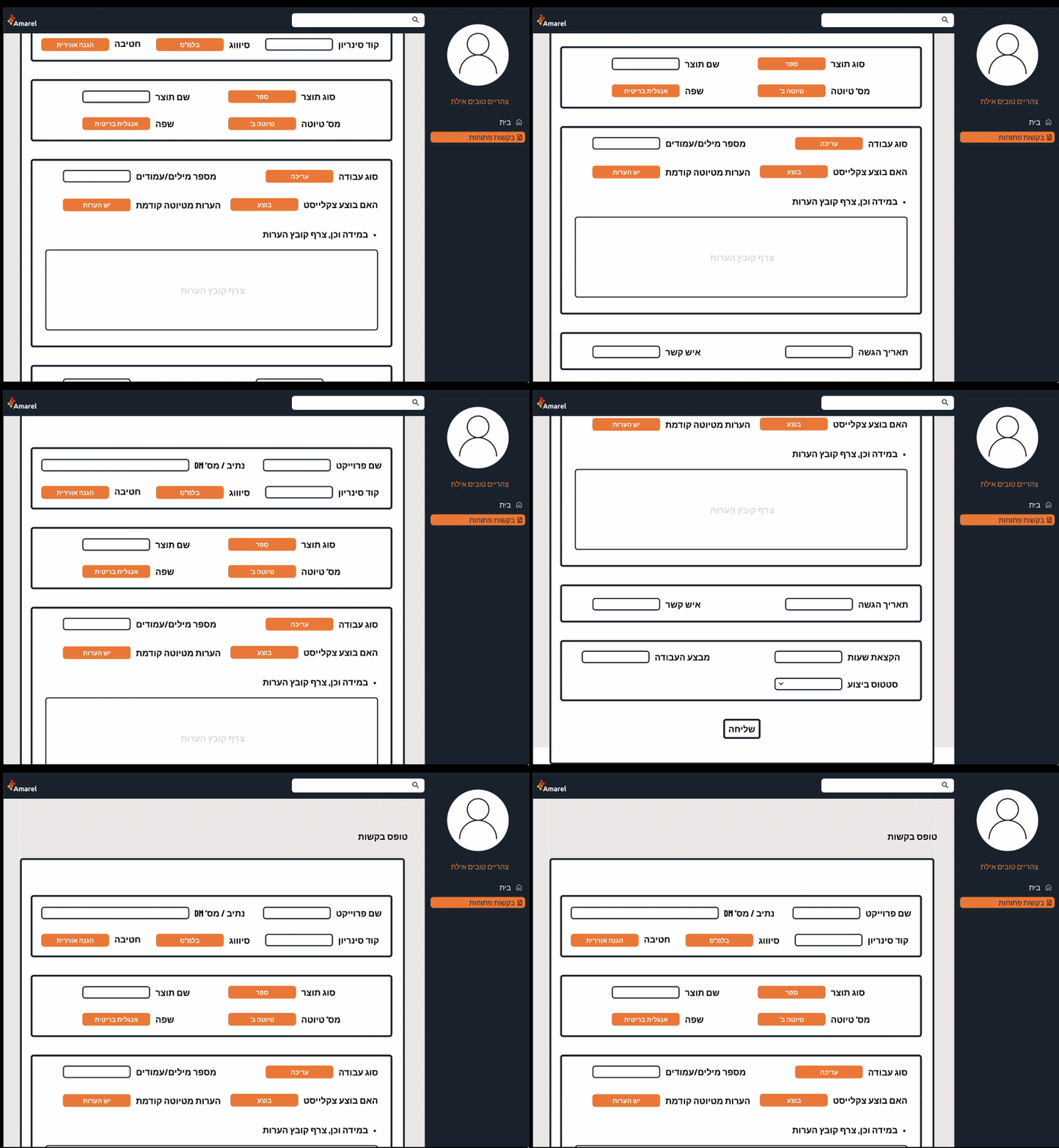

WIREFRAME
I interviewed Eilat, and these are the key findings:
The original work request form was built as a static document focused on data entry rather than workflow management. While it captured all the required information, it lacked a clear structure and provided no support for managing requests after submission.
Key Issues
-
Information overload – A large number of fields were displayed at once, making the form difficult to scan and complete.
-
Poor visual hierarchy – Similar field styles made it hard for users to identify the most important information.
-
No workflow support – The form ended after submission, with no visibility into request status, ownership, or progress.
-
Manual task assignment – Work requests had to be distributed manually, resulting in unnecessary communication between managers.
-
Limited usability – The interface was outdated and did not support an efficient, intuitive user experience.
Redesigned Work Request Form
The work request form was redesigned to improve usability, reduce cognitive load, and create a more structured experience. Information was reorganized into logical sections, allowing users to complete the form faster and with greater confidence.
Design Improvements
-
Clear information hierarchy – Related fields were grouped into logical sections, making the form easier to scan.
-
Reduced cognitive load – A cleaner layout and improved spacing help users focus on one step at a time.
-
Improved visual organization – Important fields are easier to identify through consistent alignment and sectioning.
-
Simplified workflow – The form supports a faster, more intuitive work request submission process.
-
Better user experience – A modern interface that is easier to understand, navigate, and complete.
.
Flow 1
Dashboard
The dashboard serves as the central workspace for department managers, providing a real-time overview of project requests and ongoing activities. It was designed to support quick decision-making by displaying key performance indicators (KPIs), including open requests, ongoing tasks, delayed projects, and completed work. Additionally, the dashboard features a workload distribution chart and a Gantt timeline, enabling managers to monitor project progress, identify scheduling conflicts, and allocate resources efficiently.

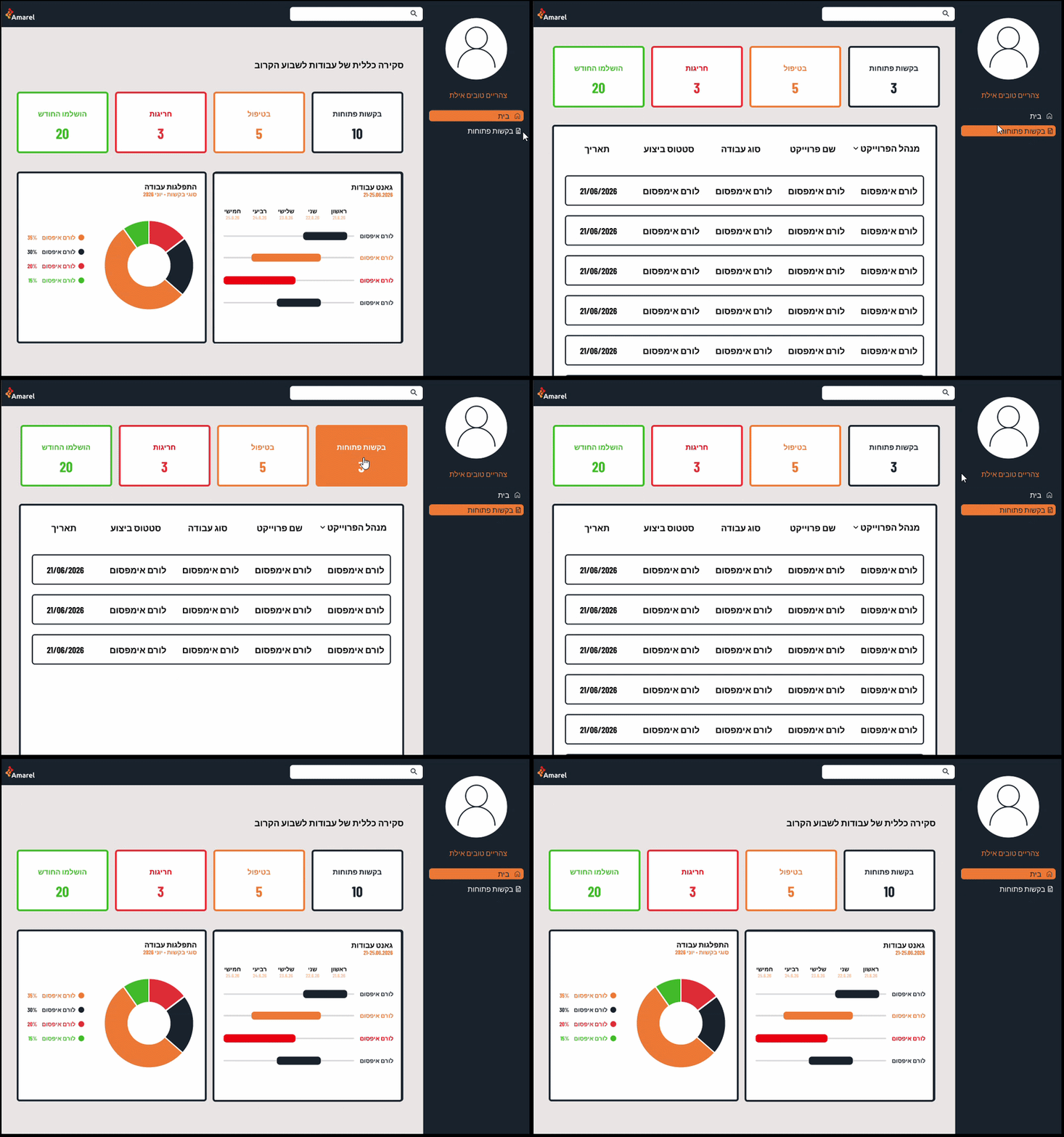
Managing Open Requests Through Smart Navigation & Status Filtering
To support efficient request management, the dashboard was designed as a starting point for users to quickly identify priorities and navigate to detailed request lists. The navigation flow connects the dashboard overview with the Open Requests screen, allowing users to move seamlessly from monitoring activity to taking action. Status filter cards at the top of the screen provide immediate visibility into request distribution and enable users to filter tasks based on their current status. This approach reduces cognitive load, improves task prioritization, and helps users manage requests more effectively.

-
General Overview (Analytics Dashboard): Visualizes the breakdown of work requests across quarters using dynamic donut charts. This high-level view allows managers to instantly identify workload patterns, resource allocations, and operational bottlenecks before assigning incoming tasks.
-
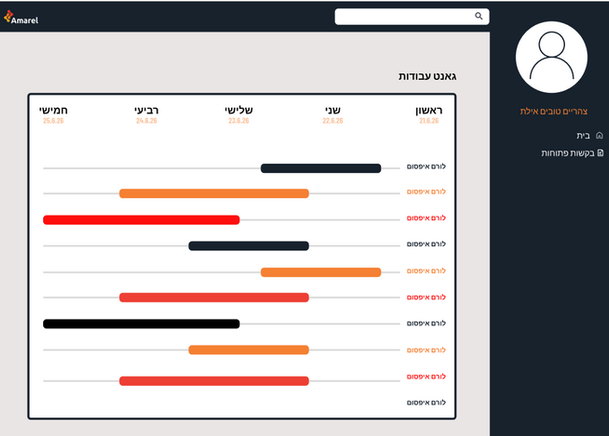
Gantt View (Timeline & Capacity Management): Provides a clear, chronological breakdown of active projects. By visualizing current team bandwidth and schedules, the manager can route new requests efficiently without overwhelming individual team members.
Flow 2
Team Lead Operational Dashboard
To help Team Leads manage daily workflows efficiently and respond quickly to task updates, I designed a centralized dashboard that prioritizes real-time status tracking and action-oriented alerts.

-
KPI Summary Cards (Top Bar): High-level metric cards provide immediate status visibility (Open Requests, In Progress, Overdue/Exceptions, and Completed this Month), allowing managers to assess overall health at a glance.
-
Interactive Notification Panel (Left): Real-time, dismissible alert cards keep the lead updated on critical project milestones and delays (e.g., QA status, submission alerts, and schedule overruns) without cluttering the main workspace.
-
Weekly Gantt View (Right): A streamlined timeline visualization mapping out task schedules for the upcoming week, enabling fast capacity reassessment and workload adjustments.
-
Structured Work Request Form: Navigating to "Work Order" opens a standardized form with clear visual grouping (project details, product specs, file attachments, and date pickers) designed to prevent submission errors.
-
Smooth Redirect & Feedback: Upon submitting the form, the user is redirected back to the main dashboard, ensuring a continuous operational workflow.
-
Dedicated Work Status View: Through the side menu, users can access the "Work Status" table, which aggregates all active requests into a searchable grid. This screen highlights key metadata—such as submission dates, task types, and current progress—giving managers quick operational control to filter and monitor requests through completion.


the Gantt Chart screen provides a clean visual timeline of scheduled work orders across the week. By mapping active tasks against dates and employee assignments, this view gives managers real-time visibility into team capacity, helping them identify overlaps, manage deadlines, and route new requests efficiently without overloading resources.