HomeFlow
Empowering homeowners to coordinate contractors, control budgets, track 3D room-by-room progress, and banish renovation anxiety.

INTRODUCTION
Bringing clarity and calm to the construction chaos.
Managing a home renovation is notoriously complex, often fraught with budget overruns and communication friction. This all-in-one mobile app streamlines the entire process—from contractor discovery and task tracking to real-time schedule management. Built around a powerful budget management core, the solution enables users to maintain strict control over their expenses while featuring an interactive 2D-to-3D blueprint viewer that instantly turns complex technical layouts into visual spatial models
THE PROBLEM
The Renovation Anxiety Crisis
Home renovation projects are notoriously chaotic for homeowners. The lack of centralized tools leads to financial misalignment, fragmented communication with vendors, and difficulty translating technical blueprints into spatial reality. Without a unified system to track progress and expenses, users quickly feel overwhelmed and lose control of their project.

Budget Overruns

Lack of communication from supplier

Misunderstanding in drawings

Scattered Tracking
THE GOAL
all-in-one renovation management platform
To create an intuitive, all-in-one renovation management platform that empowers homeowners to execute their vision on time and within budget. The product aims to simplify complex project workflows, bring transparency to financial tracking, and bridge the gap between technical spatial planning and everyday user comprehension.
THE VALUE
structured digital experience
By transforming a historically fragmented process into a structured digital experience, the app gives homeowners total peace of mind and complete project control. Real-time budget tracking prevents costly surprises, intuitive 2D-to-3D visualization eliminates design misunderstandings, and unified communication streams cut down project delays—delivering a faster, smarter, and stress-free renovation.
peace of mind
Real-time tracking
intuitive 2D-to-3D visualization
unified communication streams
RESEARCH INSIGHTS
What We Uncovered
Financial Anxiety Stems from Unseen Expenses
-
Insight: 82% of homeowners experienced budget overruns, primarily because minor, unexpected expenses were not tracked in real time.
-
UX Decision: Designed a dynamic budget engine that automatically categorizes costs and alerts users as they approach spending thresholds.
2D Blueprints Create a Spatial Comprehension Gap
-
Insight: Non-professionals heavily struggle to translate 2D architectural drawings into physical scale, leading to costly mid-project design changes.
-
UX Decision: Integrated an instant 2D-to-3D interactive viewer on the same screen to give users immediate visual clarity without leaving their layout context.
Communication Scatter Causes Task Slippage
-
Insight: Users routinely manage vendor messaging across WhatsApp, email, and phone calls, resulting in lost receipts, missing approvals, and delayed timelines.
-
UX Decision: Created a centralized communication and document hub tied directly to specific calendar events and tasks
Milestone Ambiguity Leads to Vendor Friction
-
Insight: Homeowners often feel uncertain about project progress, causing anxiety and mistrust regarding payment release schedules for contractors.
-
UX Decision: Implemented a visual milestone tracker that ties task completion directly to contractor payment schedules for maximum transparency.
Decision Fatigue Overwhelms Project Management
-
Insight: Managing hundreds of simultaneous choices (materials, appointments, tasks) causes users to miss deadlines and misplace essential project details.
-
UX Decision: Built a prioritized daily task feed and schedule view that surfaces only the most urgent pending decisions first.
PERSONA
Maya Lin

Age: 34
Occupation: Senior Marketing Manager
Location: Tel Aviv, Israel
Tech Literacy: High
Current Situation: Purchased a 4-room apartment needing a full interior renovation while working full-time.
"I need complete visibility into my renovation budget and timeline so I don't run into unexpected costs or delays, but I don't have hours every day to manage ten different tools and contractors."
Goals & Motivations
Maintain Strict Financial Control: Track real-time expenditures, incoming supplier invoices, and unexpected costs against a fixed ceiling budget to avoid cost overruns.
Streamline Communication: Keep all contractor updates, schedules, and floor plan revisions centralized in one source of truth.
Visualize the Outcome: Bridge the gap between 2D architectural blueprints and spatial reality to make confident approvals quickly.
Ensure Milestone Adherence: Track project progress visually to know exact phase statuses (demolition, plumbing, finishing) without needing daily site visits.
Frustrations & Pain Points
Financial Anxiety: Miscalculated expenses, hidden contractor fees, and difficulty visualizing remaining funds per category (lighting, tiling, labor).
Communication Chaos: Managing information fragmented across WhatsApp chats, email threads, PDF quotes, and physical paper blueprints.
Spatial Misunderstanding: Difficulty reading traditional 2D technical blueprints, leading to fear of approving dimensions or layouts that won't work in reality.
Lack of Progress Transparency: Feeling out of the loop regarding daily site updates and delayed tasks.
WIREFRAME
From Research to Design
Research showed that users needed a simple way to understand the current state of their renovation without navigating through multiple screens. The redesigned dashboard therefore prioritizes progress, budget, alerts, and upcoming tasks, giving users an immediate overview and helping them stay in control of the project
Before

After

Managing Professionals
The research highlighted the need for a more organized and transparent way to manage the professionals involved in a renovation. The new design transforms a basic contact list into a visual workspace where users can track suppliers, monitor progress, access contact information, and manage project documents in one place.
Before

Before

After

After


From Data to Financial Insights
The research revealed that users needed more than a list of expenses—they needed a clear understanding of where their money was going. The redesigned experience transforms a static budget table into a visual overview, helping users monitor spending, identify deviations, and stay in control of their renovation budget.
From Task List to Actionable Overview
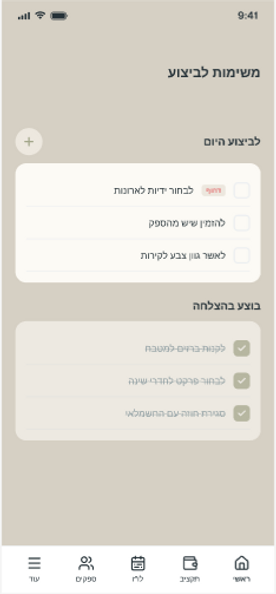
The research showed that users needed a clearer way to manage and prioritize renovation tasks. The redesigned experience transforms a simple task list into an actionable overview, helping users quickly identify priorities, track progress, and stay on top of upcoming tasks.


Before

After


Screens
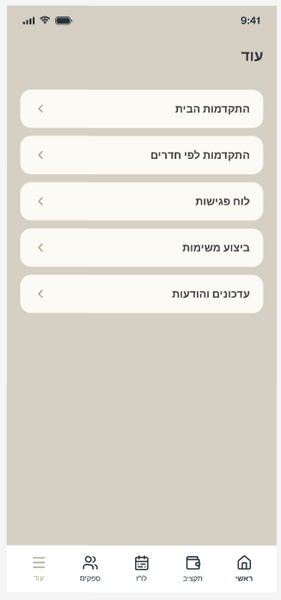
The app brings the entire renovation process into one clear and accessible experience. Users can monitor progress by room, manage upcoming meetings with professionals, receive updates and messages, and stay informed about important project activities. Each screen is designed to provide relevant information at a glance, helping homeowners stay organized, make informed decisions, and maintain control throughout the renovation.


The Room-by-Room
Progress screen gives homeowners a clear overview of the renovation journey, organized by individual spaces such as the kitchen, living room, and bedrooms. By selecting a room, users can easily drill down into its specific plans and visualize the space through both 2D layouts and 3D views. This structure helps users understand the progress of each area, explore design details, and keep track of the renovation as a whole.

